> ## Documentation Index
> Fetch the complete documentation index at: https://hedera-0c6e0218-docs--429.mintlify.site/llms.txt
> Use this file to discover all available pages before exploring further.
# Verify a Smart Contract on HashScan
> How to verify a smart contract using the HashScan Smart Contract Verification tool.
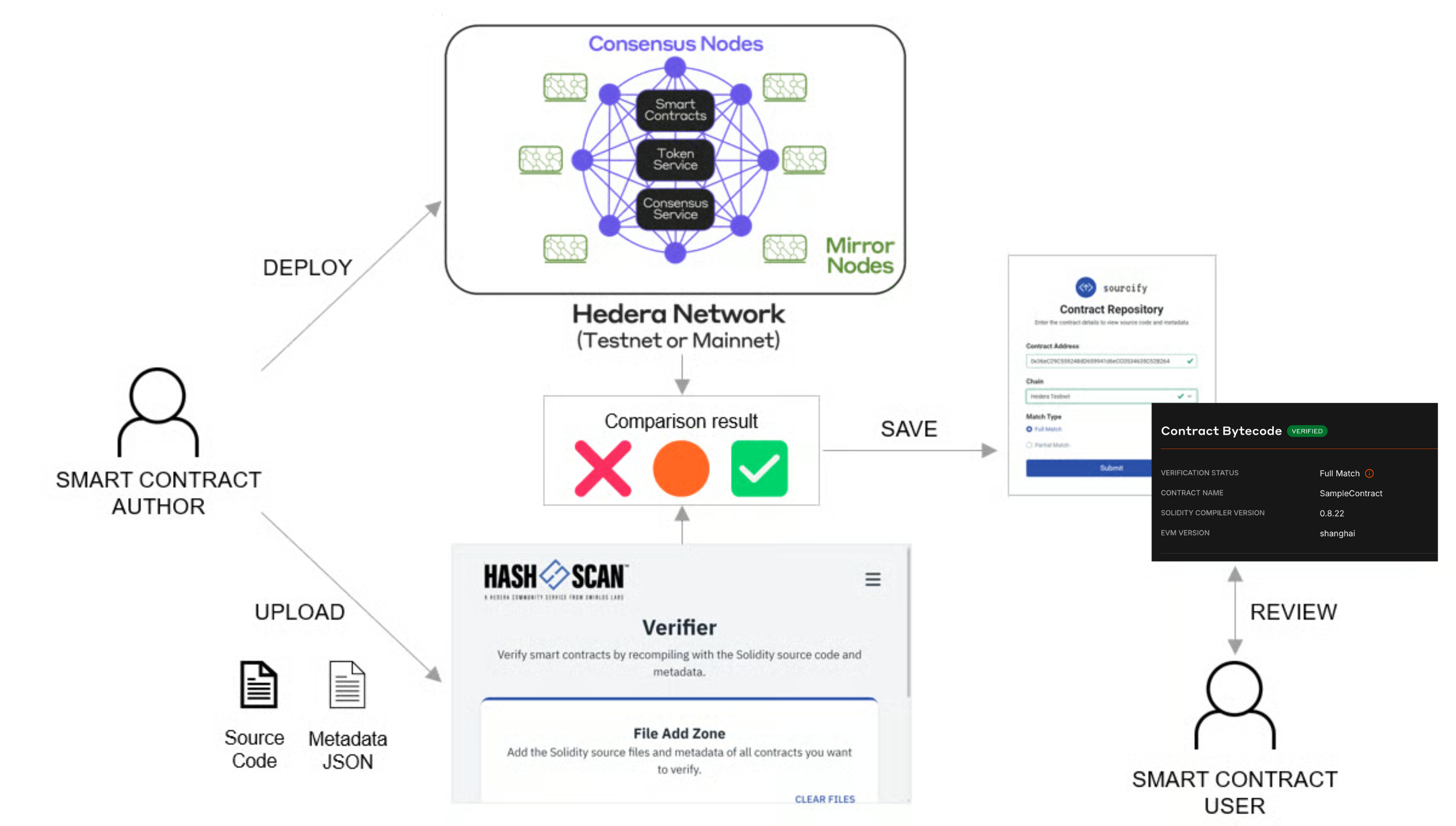
Verifying smart contracts helps ensure the deployed bytecode matches the expected source files. [HashScan](https://hashscan.io/) Smart Contract Verifier is a tool that simplifies this process. This guide will walk through the basic steps of smart contract verification using the HashScan Smart Contract Verifier tool.
***📣 Note: This is an initial release. API functionalities will see
enhancements in upcoming updates of the***
[*https://github.com/hashgraph/hedera-sourcify*](https://github.com/hashgraph/hedera-sourcify)
*repository.*
***
## Prerequisites
* Solidity [source code file](/hedera/core-concepts/smart-contracts/verifying-smart-contracts-beta#smart-contract-source-code) of the deployed smart contract.
* Solidity [JSON (metadata) file](/hedera/core-concepts/smart-contracts/verifying-smart-contracts-beta#the-metadata-file) of the deployed smart contract.
* EVM address of the smart contract deployed on the Hedera network.
***
## Table of Contents
1. [Find the Contract](#step-1%3A-find-the-contract-on-hashscan)
2. [Import Source Files](#step-2%3A-import-source-files)
3. [Verify Contract](#step-3%3A-verify-contract)
4. [Verification Match](#step-4%3A-verification-match)
5. [Re-Verify Smart Contract](#step-5%3A-re-verify-smart-contract)
6. [Additional Resources](#additional-resources)
***
## Step 1: Find the Contract on HashScan
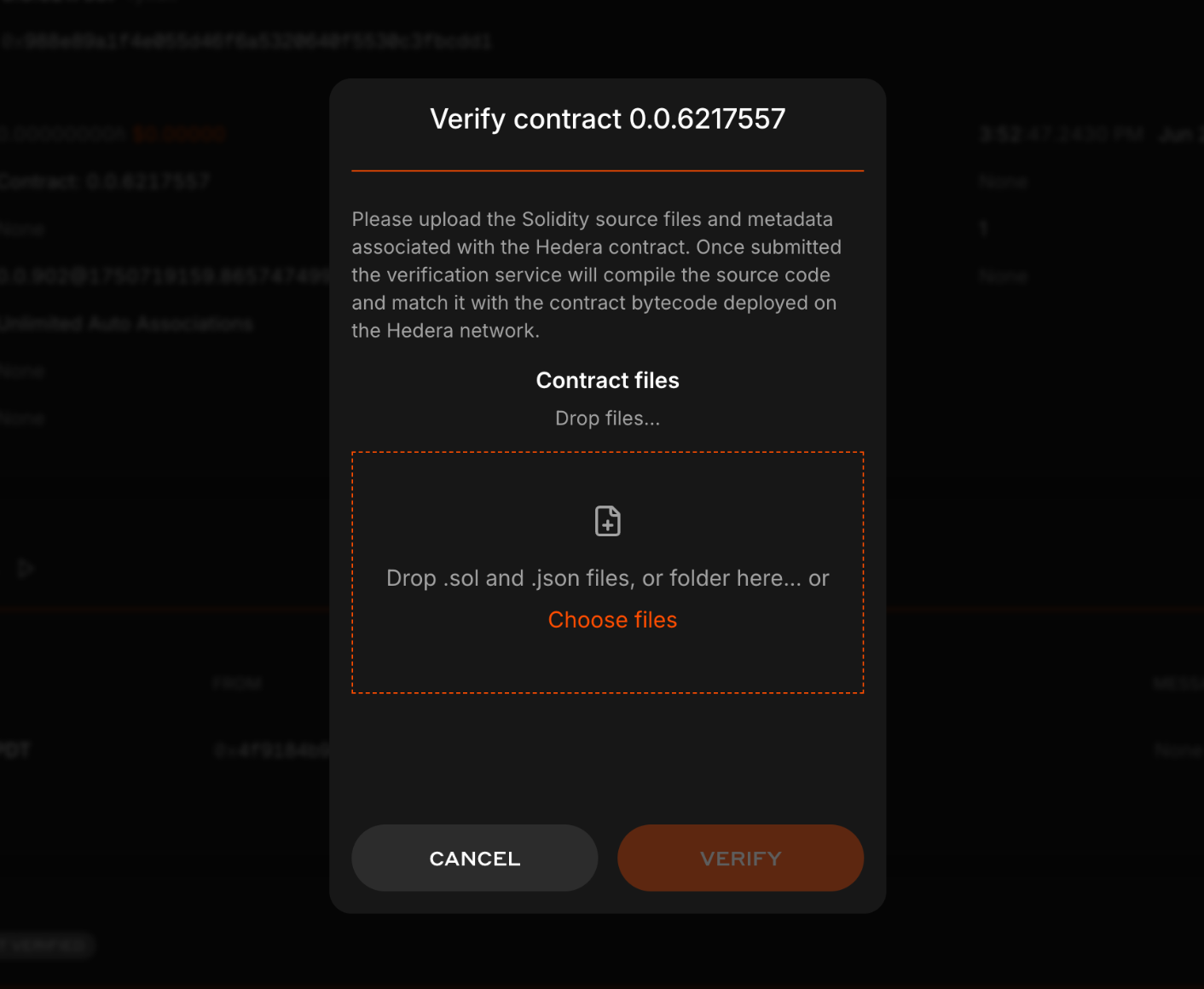
Open a web browser and navigate to [HashScan](https://hashscan.io/). Make sure you are on the correct Hedera network (mainnet, testnet, or previewnet), and search for the deployed contract address in the search bar at the top of the page. In the ***Contract Bytecode*** section click on ***Verify***. The source code file importer popup window will open.
***
## Step 2: Import Source Files
Add your Solidity source code files in the source file importer popup. Source files include the smart contract (`.sol`) [source code file](/hedera/core-concepts/smart-contracts/verifying-smart-contracts-beta#smart-contract-source-code) and [metadata](/hedera/core-concepts/smart-contracts/verifying-smart-contracts-beta#the-metadata-file) (`.json` ) file. The metadata file can be found in the `artifacts/` directory of your smart contract project and its name correlates with the smart contract. For example, the metadata for the `HelloHedera.sol` contract would be called `HelloHedera.json`.
1. **Remix**:
* **Required for Full Match Verification**: Both the metadata file found in the `contracts/artifacts/` folder and the smart contract's Solidity file. More details [here](/hedera/core-concepts/smart-contracts/verifying-smart-contracts-beta#remix-ide-beginner).
2. **Hardhat**:
* **Required for Full Match Verification**: Only the output of the compilation JSON file found in the `/artifacts/build-info/` folder. More details [here](/hedera/core-concepts/smart-contracts/verifying-smart-contracts-beta#hardhat-intermediate).
3. **Solidity Compiler (solc)**:
* **Required for Full Match Verification**: Both the metadata file (generated by `solc --metadata`) and the smart contract's Solidity file. More details [here](/hedera/core-concepts/smart-contracts/verifying-smart-contracts-beta#solidity-compiler-advanced).
4. **Foundry**:
* **Required for Full Match Verification**: Both the metadata file (generated by `forge-build`) and the smart contract's Solidity file.
***Note: Uploading only the Solidity file without the metadata file will result in a Partial Match.***
***
## Step 3: Advanced Manual Verification for Complex Contracts
For complex projects with multiple dependencies (such as OpenZeppelin libraries) or upgradeable proxy contracts, manually uploading individual source files can be **extremely difficult and error-prone**. Each dependency file must be uploaded separately, and ensuring all imports are correctly resolved can be challenging.
A more robust approach is to programmatically verify the contract using hardhat/foundry directly but you can also take a manual approach where you generate a **`single, self-contained metadata.json file`** that includes all source code dependencies inline. This single file can then be uploaded to HashScan for verification.
### Why Use This Approach?
When your smart contract imports many external libraries and multiple files, the standard manual verification process requires you to:
* Upload the main contract `.sol` file
* Upload the metadata `.json` file
* Upload **every** imported dependency file (which can be dozens of files)
This is tedious and prone to errors. The advanced approach bundles everything into one file.
### Generating the Single Metadata File
Both Hardhat and Foundry projects can be configured to generate this single file using community-developed scripts that leverage the Sourcify standard.
1. **Download the metadata generation script** from [Generate Hedera SC Metadata Repo](https://gist.github.com/kpachhai/972d63c5f5ecd9bbc718ab4dd34d5f29):
```bash theme={null}
curl -O https://gist.githubusercontent.com/kpachhai/972d63c5f5ecd9bbc718ab4dd34d5f29/raw/generate_hedera_sc_metadata.sh
chmod +x generate_hedera_sc_metadata.sh
```
2. **Run the script** to generate the bundles:
```bash theme={null}
# USAGE:
# ./generate_hedera_sc_metadata.sh [ContractName] [ContractName=0xAddress] ...
# EXAMPLES:
# ./generate_hedera_sc_metadata.sh MyToken
# ./generate_hedera_sc_metadata.sh MyToken=0x1234567890abcdef...
# ./generate_hedera_sc_metadata.sh src/MyContract.sol:MyContract=0x9876...
# For example for a contract "MyToken", you would do:
./generate_hedera_sc_metadata.sh MyToken
```
3. This produces a directory (e.g., `verify-bundles/`) containing a single `metadata.json` file for each contract.
```bash theme={null}
>> tree verify-bundles/
verify-bundles/
├── MANIFEST.txt
└── MyToken
└── metadata.json
```
4. **On HashScan**, go to the contract's page, click **Verify**, and upload the corresponding single `metadata.json` file.
### When to Use This Approach
Use the single `metadata.json` approach when:
* Your contract imports multiple external libraries and files (OpenZeppelin, etc.)
* You're verifying upgradeable proxy contracts
* The standard manual upload process is too cumbersome
* You want a more reliable verification workflow
**Prefer Programmatic Verification:** While this advanced manual approach is
more robust than uploading individual files, the **programmatic verification**
methods using Hardhat's `hashscan-verify` plugin or Foundry's `forge
verify-contract` command are even more reliable and efficient. See the
standalone verification guides for fully automated workflows.
***
## Step 4: Verify Contract
After importing the source files, if you get the "*Contract \ is ready to be verified"* message, click **VERIFY** to initiate the verification process. Sourcify will then compare the deployed contract bytecode to the source files you imported in the previous step.
***
## Step 5: Verification Match
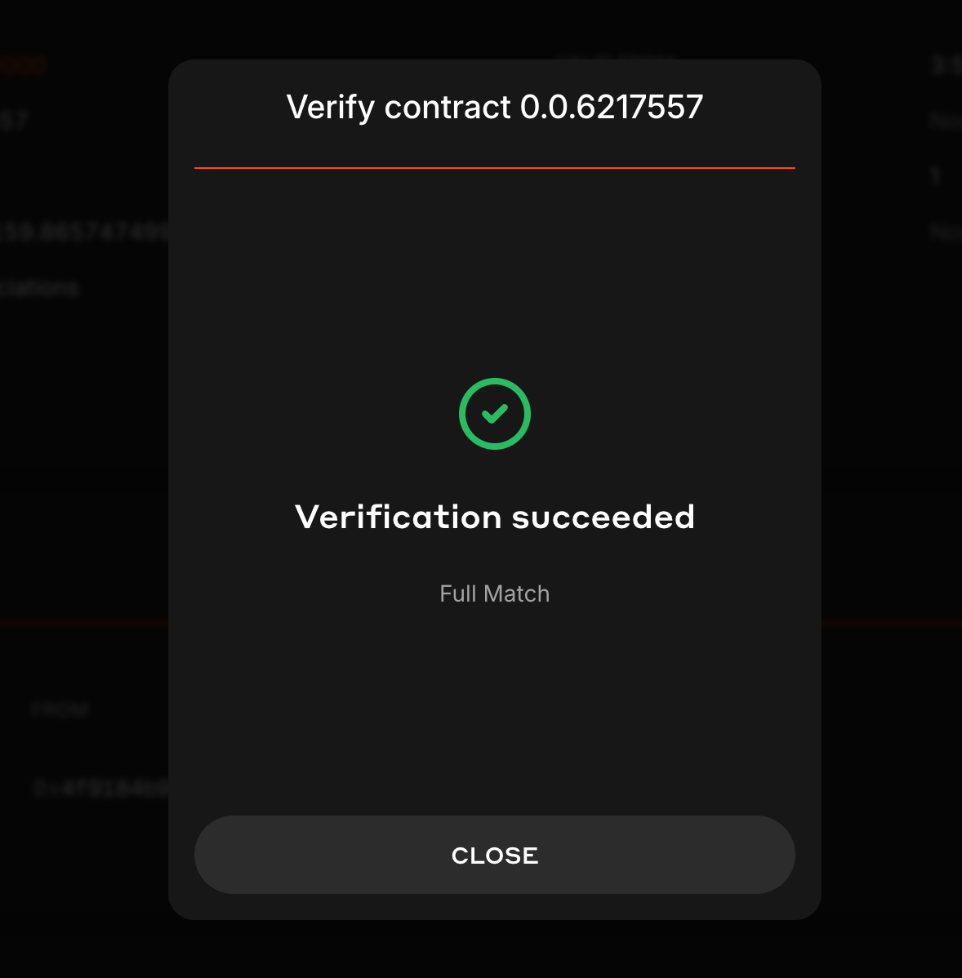
If your verification is successful, the verifier will return either a [Full Match](https://docs.sourcify.dev/docs/full-vs-partial-match/#full-perfect-matches) or [Partial Match](https://docs.sourcify.dev/docs/full-vs-partial-match/#partial-matches) status. Let's review each verification status and what they mean:
* **Full Match**: Indicates the bytecode is a full (perfect) match, including all the metadata. The contract source code and metadata settings are identical to the deployed version.
* **Partial Match**: Indicates the bytecode *mostly* (partially) matches with the deployed contract, except for the metadata hash like comments or variable names. It is usually sufficient for most verification purposes.
To learn more about each verification match status, head over to the official Sourcify documentation [here](https://docs.sourcify.dev/docs/full-vs-partial-match/).
**Congratulations! 🎉 You have successfully learned how to verify a smart contract. Feel free to reach out on** [**Discord**](https://hedera.com/discord) **if you have any questions!**
***
## Step 6: Re-Verify Smart Contract
If you change your contract or want to upgrade your contract from a **Partial Match** to a **Full Match**, there are two options for re-verification:
#### Option 1
Head to the smart contract verifier [page](https://verify.hashscan.io/) and import your new updated source files.
Enter the smart contract address and chain, then click ***Verify***.
#### Option 2
Revisit [**Step 1**](#step-1%3A-find-the-contract-on-hashscan) and use the ***Re-verify Contract*** flow. Then proceed to Steps 2 through 4.
***
## Video Tutorial
## Additional Resources
**➡** [**Smart Contract Verification API**](/hedera/sdks-and-apis/smart-contract-verification-api)
**➡** [**HashScan Network Explorer**](https://hashscan.io/)
**➡** [**Smart Contract Verifier Page**](https://verify.hashscan.io/)
**➡** [**Verified Contract Repository**](https://repository-verify.hashscan.io/select-contract/)
**➡** [**Sourcify Documentation**](https://docs.sourcify.dev/docs/intro)
**➡** [**Smart Contract Documentation**](/hedera/core-concepts/smart-contracts/verifying-smart-contracts-beta)
[GitHub](https://github.com/theekrystallee) |
[X](https://X.com/theekrystallee)
[GitHub](https://github.com/Nana-EC) |
[LinkedIn](https://www.linkedin.com/in/nconduah/)
[GitHub](https://github.com/ed-marquez) |
[LinkedIn](https://www.linkedin.com/in/ed-marquez/)
[GitHub](https://github.com/quiet-node) |
[LinkedIn](https://www.linkedin.com/in/logann131/)
 ***
## Step 2: Import Source Files
Add your Solidity source code files in the source file importer popup. Source files include the smart contract (`.sol`) [source code file](/hedera/core-concepts/smart-contracts/verifying-smart-contracts-beta#smart-contract-source-code) and [metadata](/hedera/core-concepts/smart-contracts/verifying-smart-contracts-beta#the-metadata-file) (`.json` ) file. The metadata file can be found in the `artifacts/` directory of your smart contract project and its name correlates with the smart contract. For example, the metadata for the `HelloHedera.sol` contract would be called `HelloHedera.json`.
***
## Step 2: Import Source Files
Add your Solidity source code files in the source file importer popup. Source files include the smart contract (`.sol`) [source code file](/hedera/core-concepts/smart-contracts/verifying-smart-contracts-beta#smart-contract-source-code) and [metadata](/hedera/core-concepts/smart-contracts/verifying-smart-contracts-beta#the-metadata-file) (`.json` ) file. The metadata file can be found in the `artifacts/` directory of your smart contract project and its name correlates with the smart contract. For example, the metadata for the `HelloHedera.sol` contract would be called `HelloHedera.json`.
 ***
## Step 5: Verification Match
If your verification is successful, the verifier will return either a [Full Match](https://docs.sourcify.dev/docs/full-vs-partial-match/#full-perfect-matches) or [Partial Match](https://docs.sourcify.dev/docs/full-vs-partial-match/#partial-matches) status. Let's review each verification status and what they mean:
* **Full Match**: Indicates the bytecode is a full (perfect) match, including all the metadata. The contract source code and metadata settings are identical to the deployed version.
* **Partial Match**: Indicates the bytecode *mostly* (partially) matches with the deployed contract, except for the metadata hash like comments or variable names. It is usually sufficient for most verification purposes.
***
## Step 5: Verification Match
If your verification is successful, the verifier will return either a [Full Match](https://docs.sourcify.dev/docs/full-vs-partial-match/#full-perfect-matches) or [Partial Match](https://docs.sourcify.dev/docs/full-vs-partial-match/#partial-matches) status. Let's review each verification status and what they mean:
* **Full Match**: Indicates the bytecode is a full (perfect) match, including all the metadata. The contract source code and metadata settings are identical to the deployed version.
* **Partial Match**: Indicates the bytecode *mostly* (partially) matches with the deployed contract, except for the metadata hash like comments or variable names. It is usually sufficient for most verification purposes.
 To learn more about each verification match status, head over to the official Sourcify documentation [here](https://docs.sourcify.dev/docs/full-vs-partial-match/).
**Congratulations! 🎉 You have successfully learned how to verify a smart contract. Feel free to reach out on** [**Discord**](https://hedera.com/discord) **if you have any questions!**
***
## Step 6: Re-Verify Smart Contract
If you change your contract or want to upgrade your contract from a **Partial Match** to a **Full Match**, there are two options for re-verification:
#### Option 1
Head to the smart contract verifier [page](https://verify.hashscan.io/) and import your new updated source files.
To learn more about each verification match status, head over to the official Sourcify documentation [here](https://docs.sourcify.dev/docs/full-vs-partial-match/).
**Congratulations! 🎉 You have successfully learned how to verify a smart contract. Feel free to reach out on** [**Discord**](https://hedera.com/discord) **if you have any questions!**
***
## Step 6: Re-Verify Smart Contract
If you change your contract or want to upgrade your contract from a **Partial Match** to a **Full Match**, there are two options for re-verification:
#### Option 1
Head to the smart contract verifier [page](https://verify.hashscan.io/) and import your new updated source files.
 Enter the smart contract address and chain, then click ***Verify***.
 #### Option 2
Revisit [**Step 1**](#step-1%3A-find-the-contract-on-hashscan) and use the ***Re-verify Contract*** flow. Then proceed to Steps 2 through 4.
#### Option 2
Revisit [**Step 1**](#step-1%3A-find-the-contract-on-hashscan) and use the ***Re-verify Contract*** flow. Then proceed to Steps 2 through 4.
 ***
## Video Tutorial
## Additional Resources
**➡** [**Smart Contract Verification API**](/hedera/sdks-and-apis/smart-contract-verification-api)
**➡** [**HashScan Network Explorer**](https://hashscan.io/)
**➡** [**Smart Contract Verifier Page**](https://verify.hashscan.io/)
**➡** [**Verified Contract Repository**](https://repository-verify.hashscan.io/select-contract/)
**➡** [**Sourcify Documentation**](https://docs.sourcify.dev/docs/intro)
**➡** [**Smart Contract Documentation**](/hedera/core-concepts/smart-contracts/verifying-smart-contracts-beta)
***
## Video Tutorial
## Additional Resources
**➡** [**Smart Contract Verification API**](/hedera/sdks-and-apis/smart-contract-verification-api)
**➡** [**HashScan Network Explorer**](https://hashscan.io/)
**➡** [**Smart Contract Verifier Page**](https://verify.hashscan.io/)
**➡** [**Verified Contract Repository**](https://repository-verify.hashscan.io/select-contract/)
**➡** [**Sourcify Documentation**](https://docs.sourcify.dev/docs/intro)
**➡** [**Smart Contract Documentation**](/hedera/core-concepts/smart-contracts/verifying-smart-contracts-beta)